Grand Adventures has been Winter Park and Grand County’s premier snowmobile tour and rental company for decades. We have access to the best terrain in the area, providing the best views to our customers.
Snowmobiling
Off-road
CAN I OPT-OUT OF THE INCIDENT COVERAGE & REPAIR FUND?
• No, Incident Coverage & Repair Fund is a mandatory add-on for all reservations.
WHY IS THERE A 2-MACHINE MINIMUM FOR SELF-GUIDED RENTALS?
• Safety! If one machine has an issue of some sort, someone else is there to help or assist in getting more help.
DO YOU HAVE ANY 3 PERSON SNOWMOBILES?
• No, unfortunately not. A tandem (2 person) machine accommodates 1 driver and one passenger max. If you have more passengers than drivers in your group, please email or call us to inquire if a staff driver (very limited availability) may be available.
CAN I USE A DEBIT CARD FOR THE DAMAGE DEPOSIT AUTHORIZATION ON SELF-GUIDED RENTALS?
• Yes, you can. During the check-out process after your trip, we will void all damage authorizations each day assuming no damage occurs, thereby releasing your funds. Please note, by using a debit card, the bank is holding your cash.
ARE RESERVATIONS REQUIRED? HOW FAR IN ADVANCE DO I NEED TO MAKE MY RESERVATION?
• Advanced reservations are required. All reservations are subject to availability, so as soon as you know what trip, date, and time of day you want we recommend making your reservation.
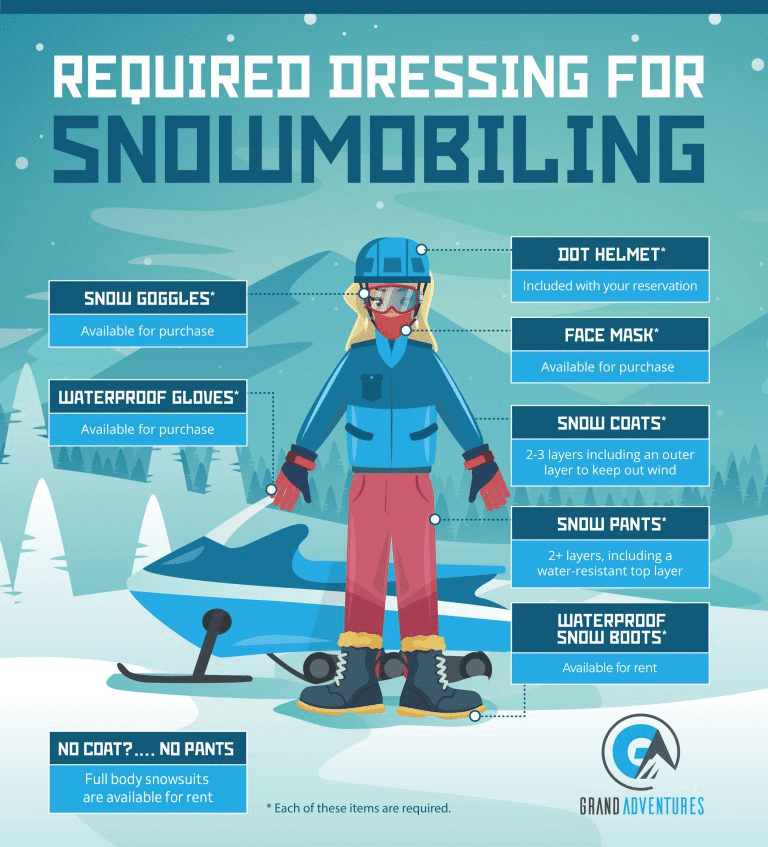
WHAT TO WEAR SNOWMOBILING:
• Dress in layers. Bring ski clothes, snow boots, gloves, and goggles (required) for eye protection. Also, neck gator, scarves and or face mask are a necessity on cold or windy days. Items are available for rent or purchase depending on item. DOT certified helmets are provided. Don’t forget a camera, sunscreen and bottled water. We do have some items for sale on site.
IS IT HARD TO OPERATE / DRIVE THESE MACHINES?
• Driving a side-by-side is very similar to driving your car. Foot pedals for gas / break, seat belts, steering wheel, automatic gearing are all the same to a traditional car. There are differences in wheelbase, weight, etc. However, if you are comfortable driving your personal car then driving a side-by-side is a relatively easy transition.
WHO CAN DRIVE AND WHO CAN RIDE?
• In order to drive a machine, you must be 18 years or older with your valid driver’s license present the day of your trip, NO exceptions.
• Passengers must be at least 4 years old. Please note children must be in a booster seat until the age of 9 per Colorado law.
• We strictly enforce these requirements at all times.
WHAT HAPPENS IF THERE IS ADVERSE WEATHER?
• Our trips run rain or shine so please come prepared for all conditions as the weather can change quickly.
• Rain Poncho’s are available for purchase
• It is a good idea to bring additional layers with you, as temperatures can be much colder at elevation.
• Please dress to get dusty and/or muddy.
• Refunds will not be given for adverse weather.
WEIGHT AND HEIGHT RESTRICTIONS
• Each machine has a maximum weight load of 1,300lbs.
• While there is no maximum height restriction, the rear seats of the machines have limited leg room which should be a consideration for taller people.
WHAT DO WE DO IF WE ARE A FAMILY OF 5?
• Each machine has a maximum capacity of 4 people regardless of size.
• If you have more people than a machine can accommodate, then you need to reserve an additional machine. Driver age restrictions still apply.
• Customers are not permitted to ride with our guides.
More Frequently Asked Questions
Should we tip our guide?
• Tips are an important part of a guide's livelihood and they are always appreciative of receiving a tip when they deliver excellent service!
Should we arrive early?
• Please arrive at the “meeting time” listed on your confirmation email.
Do we still go if it is snowing or cold?
• Yes! We operate in all weather conditions.
What if we are late due to traffic?
⦁ It is your responsibility to plan ahead. Traffic can be heavy at times and should be considered when planning travel time.
⦁ You will not be refunded because you are stuck in traffic and arriving late. Plan ahead!
Should we purchase Travel Insurance?
⦁ Yes, protect your travel investment! Our partner Travelex offers plans that can help protect your investment if your travel plans become disrupted.Click here to enroll
Is there any leeway on Age Requirements?
⦁ NO, unfortunately our age requirements are non-negotiable or subject to change.
Why am I forced to purchase the Incident Coverage & Repair Fund when I don’t want it?
⦁ Changes in the insurance market have resulted in these new coverage requirements. We have no discretion, and these policies apply to all customers.
Is there wiggle room in your cancellation policy?
⦁ Our policies are uniformly and strictly enforced, so please ensure you agree to abide by them prior to making your reservation. Given that everyone is unique and special, we cannot make exceptions.
Why do I have to do a Damage Deposit if I am already purchasing the Repair Fund?
⦁ Like all insurance policies, deductibles apply. Your damage deposit is used to ensure we can collect the deductible if necessary.
Is an International Driver’s License valid?
⦁ YES, your international Driver’s License meets our requirements. Please ensure you have it present the day of your adventure.
Snowmobiling
Off-road
OUR MISSION
• We strive to provide each guest with a safe and fun snowmobile adventure. With options that cater to all ages and abilities, from first timers to lifelong riders, we want you to find the perfect experience for your group. We aim to provide a memorable experience showcasing the awe-inspiring scenery of Grand County that will become an endeavor that our guests return for year after year.
OUR PHILOSOPHY
• We are a family here at Grand Adventures, and our hope is that every guest with whom we interact will feel like a part of that as well. Each employee plays a vital role in our future and we take great pride in providing world-class customer service throughout your experience with us.
OUR MOTTO
• Ride the Divide! Experience everything the majestic Continental Divide has to offer, either by snowmobile (November – April) or by UTV (June-October). We love what we do, and we can’t wait to share it with you.
CAREERS
• Interested in becoming a part of the team? Please download the PDF Application and email/mail it back to us. We are hiring for the following positions in Winter Park, Fraser, and Grand Lake.
WINTER SEASONAL POSITIONS
• Snowmobile Guide
• Unguided Rentals Staff
• Office / Reservation Staff
• Snowcat Operator – experience required
• Single-Track Groomer – experience require
• Snowmobile / Small Engine Mechanic
SUMMER SEASONAL POSITIONS
• Office / Reservation Staff
• Side by Side Guide
YEAR-ROUND POSITIONS
• Office / Reservation Staff
• Snowmobile / Small Engine Mechanic
• Snowmobile / Side by Side Guide (Winter / Summer Seasons)
• Grand Adventures, along with our sister company Mad Adventures, offer seasonal (Winter and Summer) and year-round employment opportunities. We are in the unique position to employ staff on a year-round basis between our various adventures (Snowmobiling Tours & Rentals / Side by Sides / Rafting). Get your foot in the door and earn one of our coveted year-round positions!
Grand Adventures has been Winter Park and Grand County’s premier snowmobile tour and rental company for decades. We have access to the best terrain in the area, providing the best views to our customers.
Our humble beginnings date back to the 1970s on some of the first and most basic snowmobiles made. Yes, John Deere used to make snowmobiles back then! The name Grand Adventures came about under new ownership in the early 1990’s and has grown into the Grand Adventures of today. In 2011 Grand Adventures merged with Trailblazers Snowmoblle Tours in Fraser. Todays Grand Adventures has access, through our Forest Service Permits, to 4 amazing trail systems in Grand County, CO. With 5 locations, we provide our customers with the best trails Grand County and Winter Park have to offer.
OUR TEAM SKILLS
An operation as diverse and large as ours requires team work, with both our staff and our customers, to be successful. We pride ourselves on being the best we can and we think this shows on a daily basis.
Operations are conducted on public lands under a special use permit with the Arapaho Roosevelt National Forest.
BRP Experience Description: We’re proud to partner with BRP Experiences, connecting you to 225+ unforgettable destinations across the world: from open waters to deep snow, desert trails to forest routes. Already over 2 million adventures have been completed, powered by BRP’s iconic brands: Ski-Doo, Lynx, Sea-Doo, and Can-Am. Our mission is simple: make it easier for you to discover the thrill of outdoor exploration and live moments that move you. Visit https://experiences.brp.com/en-us
This mode enables people with epilepsy to use the website safely by eliminating the risk of seizures that result from flashing or blinking animations and risky color combinations.
Visually Impaired Mode
Improves website's visuals
This mode adjusts the website for the convenience of users with visual impairments such as Degrading Eyesight, Tunnel Vision, Cataract, Glaucoma, and others.
Cognitive Disability Mode
Helps to focus on specific content
This mode provides different assistive options to help users with cognitive impairments such as Dyslexia, Autism, CVA, and others, to focus on the essential elements of the website more easily.
ADHD Friendly Mode
Reduces distractions and improve focus
This mode helps users with ADHD and Neurodevelopmental disorders to read, browse, and focus on the main website elements more easily while significantly reducing distractions.
Blindness Mode
Allows using the site with your screen-reader
This mode configures the website to be compatible with screen-readers such as JAWS, NVDA, VoiceOver, and TalkBack. A screen-reader is software for blind users that is installed on a computer and smartphone, and websites must be compatible with it.
Online Dictionary
Readable Experience
Content Scaling
Default
Text Magnifier
Readable Font
Dyslexia Friendly
Highlight Titles
Highlight Links
Font Sizing
Default
Line Height
Default
Letter Spacing
Default
Left Aligned
Center Aligned
Right Aligned
Visually Pleasing Experience
Dark Contrast
Light Contrast
Monochrome
High Contrast
High Saturation
Low Saturation
Adjust Text Colors
Adjust Title Colors
Adjust Background Colors
Easy Orientation
Mute Sounds
Hide Images
Virtual Keyboard
Reading Guide
Stop Animations
Reading Mask
Highlight Hover
Highlight Focus
Big Dark Cursor
Big Light Cursor
Cognitive Reading
Navigation Keys
Voice Navigation
Accessibility Statement
grandadventures.com
November 4, 2026
Compliance status
We firmly believe that the internet should be available and accessible to anyone, and are committed to providing a website that is accessible to the widest possible audience,
regardless of circumstance and ability.
To fulfill this, we aim to adhere as strictly as possible to the World Wide Web Consortium’s (W3C) Web Content Accessibility Guidelines 2.1 (WCAG 2.1) at the AA level.
These guidelines explain how to make web content accessible to people with a wide array of disabilities. Complying with those guidelines helps us ensure that the website is accessible
to all people: blind people, people with motor impairments, visual impairment, cognitive disabilities, and more.
This website utilizes various technologies that are meant to make it as accessible as possible at all times. We utilize an accessibility interface that allows persons with specific
disabilities to adjust the website’s UI (user interface) and design it to their personal needs.
Additionally, the website utilizes an AI-based application that runs in the background and optimizes its accessibility level constantly. This application remediates the website’s HTML,
adapts Its functionality and behavior for screen-readers used by the blind users, and for keyboard functions used by individuals with motor impairments.
If you’ve found a malfunction or have ideas for improvement, we’ll be happy to hear from you. You can reach out to the website’s operators by using the following email
Screen-reader and keyboard navigation
Our website implements the ARIA attributes (Accessible Rich Internet Applications) technique, alongside various different behavioral changes, to ensure blind users visiting with
screen-readers are able to read, comprehend, and enjoy the website’s functions. As soon as a user with a screen-reader enters your site, they immediately receive
a prompt to enter the Screen-Reader Profile so they can browse and operate your site effectively. Here’s how our website covers some of the most important screen-reader requirements,
alongside console screenshots of code examples:
Screen-reader optimization: we run a background process that learns the website’s components from top to bottom, to ensure ongoing compliance even when updating the website.
In this process, we provide screen-readers with meaningful data using the ARIA set of attributes. For example, we provide accurate form labels;
descriptions for actionable icons (social media icons, search icons, cart icons, etc.); validation guidance for form inputs; element roles such as buttons, menus, modal dialogues (popups),
and others. Additionally, the background process scans all the website’s images and provides an accurate and meaningful image-object-recognition-based description as an ALT (alternate text) tag
for images that are not described. It will also extract texts that are embedded within the image, using an OCR (optical character recognition) technology.
To turn on screen-reader adjustments at any time, users need only to press the Alt+1 keyboard combination. Screen-reader users also get automatic announcements to turn the Screen-reader mode on
as soon as they enter the website.
These adjustments are compatible with all popular screen readers, including JAWS and NVDA.
Keyboard navigation optimization: The background process also adjusts the website’s HTML, and adds various behaviors using JavaScript code to make the website operable by the keyboard. This includes the ability to navigate the website using the Tab and Shift+Tab keys, operate dropdowns with the arrow keys, close them with Esc, trigger buttons and links using the Enter key, navigate between radio and checkbox elements using the arrow keys, and fill them in with the Spacebar or Enter key.Additionally, keyboard users will find quick-navigation and content-skip menus, available at any time by clicking Alt+1, or as the first elements of the site while navigating with the keyboard. The background process also handles triggered popups by moving the keyboard focus towards them as soon as they appear, and not allow the focus drift outside it.
Users can also use shortcuts such as “M” (menus), “H” (headings), “F” (forms), “B” (buttons), and “G” (graphics) to jump to specific elements.
Disability profiles supported in our website
Epilepsy Safe Mode: this profile enables people with epilepsy to use the website safely by eliminating the risk of seizures that result from flashing or blinking animations and risky color combinations.
Visually Impaired Mode: this mode adjusts the website for the convenience of users with visual impairments such as Degrading Eyesight, Tunnel Vision, Cataract, Glaucoma, and others.
Cognitive Disability Mode: this mode provides different assistive options to help users with cognitive impairments such as Dyslexia, Autism, CVA, and others, to focus on the essential elements of the website more easily.
ADHD Friendly Mode: this mode helps users with ADHD and Neurodevelopmental disorders to read, browse, and focus on the main website elements more easily while significantly reducing distractions.
Blindness Mode: this mode configures the website to be compatible with screen-readers such as JAWS, NVDA, VoiceOver, and TalkBack. A screen-reader is software for blind users that is installed on a computer and smartphone, and websites must be compatible with it.
Keyboard Navigation Profile (Motor-Impaired): this profile enables motor-impaired persons to operate the website using the keyboard Tab, Shift+Tab, and the Enter keys. Users can also use shortcuts such as “M” (menus), “H” (headings), “F” (forms), “B” (buttons), and “G” (graphics) to jump to specific elements.
Additional UI, design, and readability adjustments
Font adjustments – users, can increase and decrease its size, change its family (type), adjust the spacing, alignment, line height, and more.
Color adjustments – users can select various color contrast profiles such as light, dark, inverted, and monochrome. Additionally, users can swap color schemes of titles, texts, and backgrounds, with over seven different coloring options.
Animations – person with epilepsy can stop all running animations with the click of a button. Animations controlled by the interface include videos, GIFs, and CSS flashing transitions.
Content highlighting – users can choose to emphasize important elements such as links and titles. They can also choose to highlight focused or hovered elements only.
Audio muting – users with hearing devices may experience headaches or other issues due to automatic audio playing. This option lets users mute the entire website instantly.
Cognitive disorders – we utilize a search engine that is linked to Wikipedia and Wiktionary, allowing people with cognitive disorders to decipher meanings of phrases, initials, slang, and others.
Additional functions – we provide users the option to change cursor color and size, use a printing mode, enable a virtual keyboard, and many other functions.
Browser and assistive technology compatibility
We aim to support the widest array of browsers and assistive technologies as possible, so our users can choose the best fitting tools for them, with as few limitations as possible. Therefore, we have worked very hard to be able to support all major systems that comprise over 95% of the user market share including Google Chrome, Mozilla Firefox, Apple Safari, Opera and Microsoft Edge, JAWS and NVDA (screen readers).
Notes, comments, and feedback
Despite our very best efforts to allow anybody to adjust the website to their needs. There may still be pages or sections that are not fully accessible, are in the process of becoming accessible, or are lacking an adequate technological solution to make them accessible. Still, we are continually improving our accessibility, adding, updating and improving its options and features, and developing and adopting new technologies. All this is meant to reach the optimal level of accessibility, following technological advancements. For any assistance, please reach out to
Reservations are open for all Guided Tours & Self-Guided Rentals this winter! We anticipate opening on Nov 26th for Guided Tours. Self-Guided rentals are anticipated to open on December 10th in Winter Park.